I spent a week inside both APIs
Two tools, one job. Send a bot into a meeting, get audio and a transcript back. Recall.ai and Attendee both do that, both charge roughly fifty cents an hour, and both show up when you search for a meeting recording API. So why write a comparison at all?
Because the search results are useless. Recall publishes a comparison page that concludes Recall wins. Attendee’s fans on Reddit answer with the self-hosting argument. Nobody answers the two questions people actually type into Google: which one is the market leader, and which one do I use for in-person recording. I went through both docs, both pricing pages, and the published case studies to answer those two questions straight.
Prices here are what the vendors published around November 2026. Both change them without notice, so check the official pages before you commit a budget. Checked November 2026.
The short answer
Recall.ai is the market leader and the safer buy. More platforms, a managed service, compliance paperwork, a desktop SDK for cases a bot cannot handle.
Attendee is the cheaper option at scale, and the only one of the two you can run on your own servers. If you record tens of thousands of hours a month and you have someone who enjoys infrastructure, it wins on cost by a wide margin.
For in-person recording, neither one is the answer, and any article that tells you otherwise is selling something.
Side by side
| Recall.ai | Attendee | |
|---|---|---|
| Hosted price | About $0.50 per bot hour, first 5 hours free | About $0.50 per bot hour, 5 free hours, down to $0.35 at volume |
| Transcription | Billed separately, about $0.15 per hour, or use your own provider | Listed as included; it runs on your own provider key or the platform’s captions, so the cost may land on that provider |
| Self-hosting | Not offered | Supported, you run it |
| Licence | Proprietary | Source-available, Elastic License 2.0 |
| Platforms | Zoom, Meet, Teams, Webex, GoToMeeting, Slack huddles | Zoom, Meet, Teams, Webex on the roadmap |
| Capture beyond the bot | Desktop SDK, plus streaming and processing APIs | Bot only |
| Compliance | SOC 2, HIPAA | Not advertised |
| Support agreement | Paid, gated to enterprise | Community, or your own team |
| Bot can speak or show images | Voice agents and in-call output | Yes, audio and images |
| Best for | Product teams shipping fast | Teams with volume and a server habit |
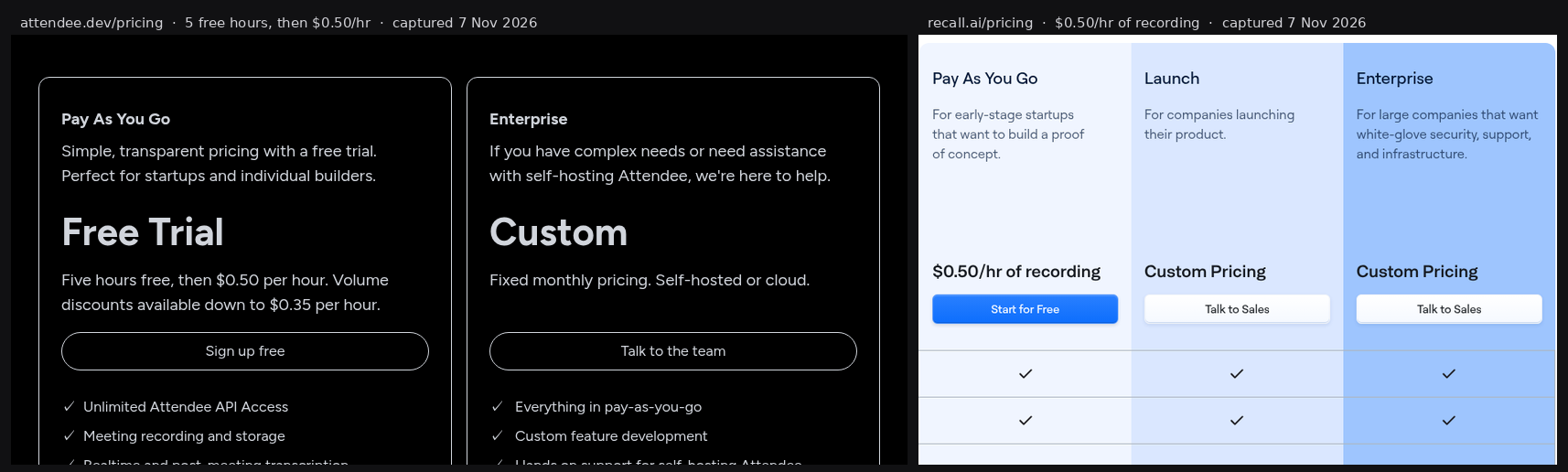
What the two pricing pages say on 7 November 2026, screenshotted from each vendor’s own site:
Where the money actually goes
At twenty hours a month the two are almost free. Twenty hours on Recall is ten dollars for the bot plus three dollars for transcription. The same twenty hours on Attendee stay inside the five free hours for the first month, then cost seven fifty.
The gap opens at scale, and it opens fast. The clearest public number comes from Chitti, an online education platform recording more than 18,000 hours of Google Meet classes every month. They wrote that Recall would have cost them over 200,000 dollars a year. They self-hosted Attendee on Digital Ocean instead and reported about 18,000 dollars a year in infrastructure. That’s under eight cents per recorded hour, and it is roughly a ninety percent cut.
Read that number with one eye closed. The case study counts servers. It doesn’t count the engineer who keeps them alive, the on-call rotation, or the afternoon you spend debugging why a bot stopped joining a customer’s tenant. If your recordings are a side feature of the product, that labor costs more than it saves.
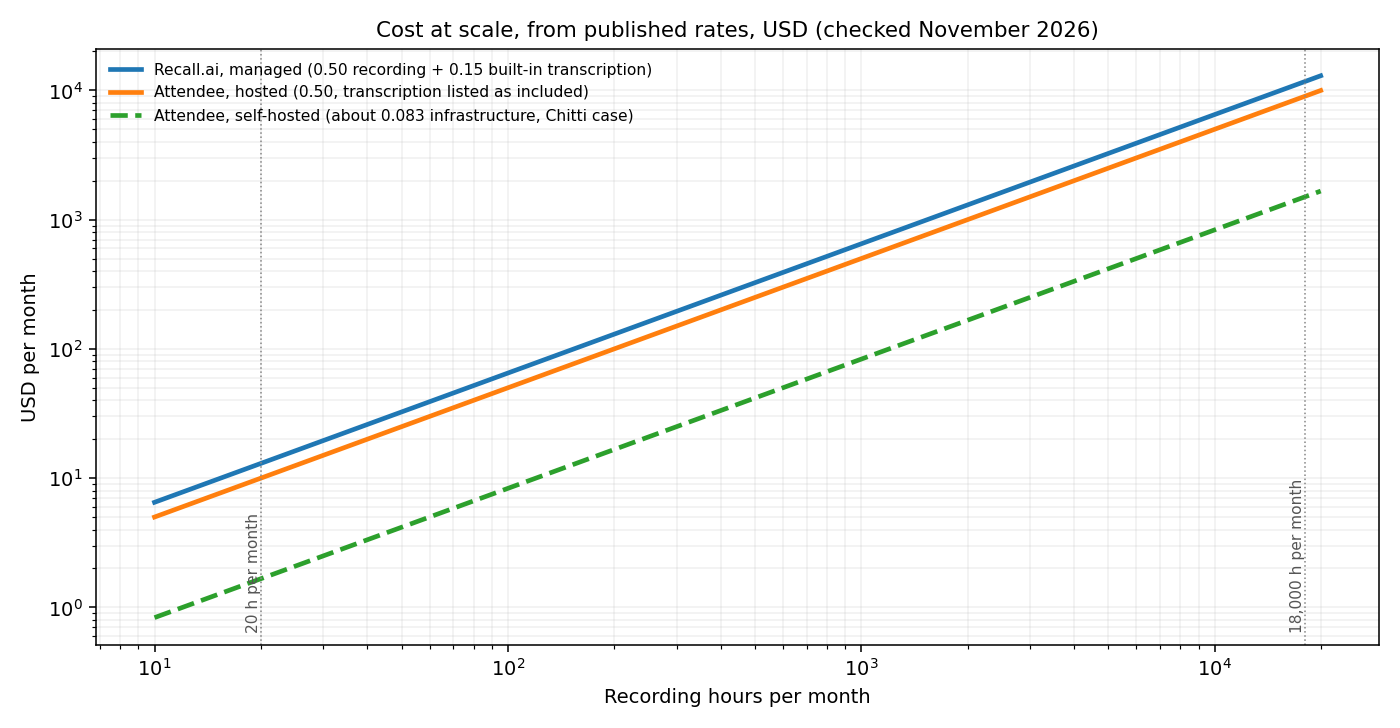
The chart is my arithmetic on the published rates, not a quote from either vendor. The self-hosted line stops being honest once you count a person’s time, which is the whole argument in the next section.
In-person recording, and why both fail
This is where the marketing gets slippery, so here is the blunt version.
Attendee is a bot. It joins a meeting through a platform integration, records what the platform sends it, and leaves. When you and three colleagues sit around a table with no call running, there is no meeting to join. Attendee cannot help you.
Recall is closer, because it ships a desktop SDK that records audio on a machine rather than inside a conference room. That is a building block, not a product. You still write the app, handle permissions across operating systems, deal with the fact that a laptop microphone is bad at picking up a table of six, and manage consent when someone walks into the room mid-sentence.
If your goal is a person in a room capturing a conversation, a meeting bot API is the wrong category. Use a phone recorder or a dedicated device. Save the API money for the calls that happen in Zoom.
Who is actually the market leader
Recall.ai. The evidence is boring but consistent. It started earlier and the category comparisons, including the ones written by competitors, treat it as the incumbent to beat. It covers more platforms, including Webex, GoToMeeting, and Slack huddles, and it carries SOC 2 and HIPAA, which is what a procurement team asks for before signing. It also sells a managed service with a support path, and companies with a compliance questionnaire rarely want to explain self-hosted infrastructure to their security reviewer.
Attendee’s own pitch does not dispute this. Their founder’s public posts lead with the self-hosting difference and a production count in the dozens of companies, not with being bigger. That is a smart position. It just is not the leader’s position.
One caution on that word. Market leader means share and breadth, not fitness for your problem. A small team with ten meetings a week and no ops person should pick the leader. A team recording lecture archives around the clock should not.
Self-hosting, the real tradeoff
Attendee’s licence is the part people misread. It is source-available under the Elastic License 2.0, not OSI open source. You can read it, run it, change it, and host it. You cannot take it and sell a competing hosted service with it. For internal use the practical difference is nil. For a startup that intends to resell meeting infrastructure, it is the whole ballgame.
The operational difference is not nil. Self-hosting means you own bot reliability, browser versions, container images, retries, storage growth, and the security of recordings that are, by definition, the most sensitive audio your company produces. That’s a real job. It’s worth doing when the volume is large enough to pay for the person doing it.
The operational gaps nobody puts in a comparison table
Two independent reviews published in 2026 gave Attendee a hard time on the boring infrastructure questions. One found no status page, no documented rate limit, no security.txt, and no certification on the hosted service, and graded the tool accordingly. The same review credited it with cursor pagination and a deduplication key so retried webhook calls do not create duplicate bots, which is the kind of detail that tells you the API was built by people who have run one before.
Recall’s gap is different and easier to price. A support agreement with a response time lives behind the enterprise plan, so a small team on pay as you go gets the platform and the docs but not a person to call at 2am when a bot stops joining.
Neither gap is fatal. Both are the sort of thing you discover in week three, when the demo is over and real tenants start failing. Ask about them before you sign, and write the answer into your own runbook.
Which one I would pick
If I were shipping a meeting product this month and I had no infrastructure team, I would use Recall and pay the premium. The extra fifteen cents an hour for transcription buys one fewer thing to build, and the platform list means a customer on Webex doesn’t become a support ticket.
If I were running an archive, a lecture platform, or anything that records more than a few thousand hours a month, I would prototype on Attendee’s hosted plan, measure the failure rate, then move to self-hosted once the numbers justify a person to run it.
If I needed in-person capture, I would not use either. I would buy a recorder and use these APIs only for the virtual half of the workflow.
The wider lesson shows up across the whole class of recall tools I have tested this year. The API you pick matters less than whether you match it to the shape of your meetings. Teams that record live calls and teams that want a searchable record of a room are two different problems wearing the same name.
If your meetings are virtual and you need notes rather than raw audio, the API layer may be overkill. A meeting notes app that already does the joining is cheaper than building on top of a bot API. And if what you actually want is a searchable memory of the calls, start with the summaries you will read before you pay for infrastructure.
This page contains affiliate links. If you buy through them, we may earn a commission at no extra cost to you. See our full disclosure.
None of the tools on this page has an affiliate relationship with us today, and neither vendor paid for coverage. We earn nothing from Recall.ai or Attendee. Prices came from the vendors’ own pricing pages and from published case studies, checked November 2026, and the ranking follows the evidence above rather than payouts.